
How to Scan APK Files for Viruses: 7 Easy & Safe Methods (2026 Guide)
Introduction
Android gives users the freedom to install apps from outside the Google Play Store using APK files. While this flexibility is one of Android’s greatest strengths, it also comes with security risks. Downloading APK files from unknown or untrusted websites can expose your device to malware, spyware, ransomware, and other harmful software. How to Scan APK Files for Viruses
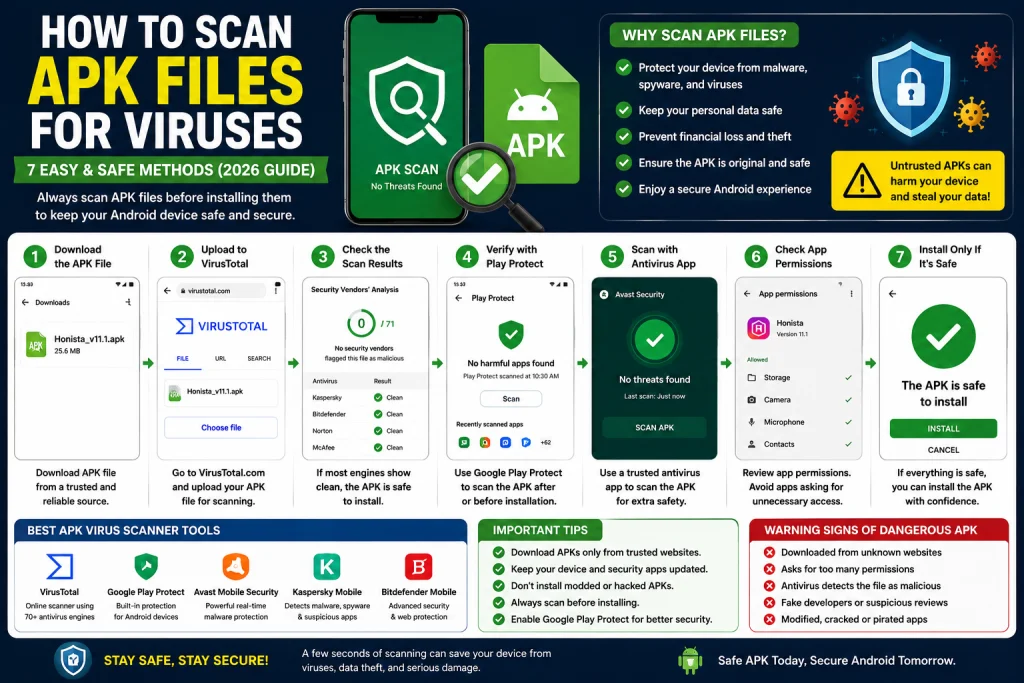
Before installing any APK, it is essential to scan it for viruses. A quick security check can help protect your personal data, passwords, photos, and financial information from cyber threats. Fortunately, there are several reliable methods to verify whether an APK file is safe.
This guide explains how to scan APK files for viruses using trusted tools and best security practices. Whether you’re downloading games, social media apps, or productivity software, these steps will help you install APK files with confidence. How to Scan APK Files for Viruses
What Is an APK File?
An APK (Android Package Kit) is the file format Android uses to install applications. Every app installed outside the Google Play Store is typically distributed as an APK.
An APK contains:
- Application code
- Images and resources
- App permissions
- Configuration files
- Digital signatures
Although APK files are safe when obtained from trusted developers, modified or fake APKs can contain malicious code.
Why Should You Scan APK Files?
Scanning APK files before installation helps prevent security problems such as:
- Malware infections
- Spyware tracking
- Data theft
- Fake banking apps
- Ransomware
- Adware
- Hidden cryptocurrency miners
A simple scan takes only a few moments and can prevent significant damage.
Method 1: Scan APK Files with VirusTotal
One of the most trusted online malware scanning services is VirusTotal.
VirusTotal analyzes uploaded files using multiple antivirus engines, making it an excellent first step before installing an APK.
Steps
- Open the VirusTotal website in your browser.
- Upload the APK file.
- Wait for the scan to complete.
- Review the results.
- If multiple antivirus engines detect malware, avoid installing the file.
VirusTotal provides a comprehensive analysis without requiring software installation.
Method 2: Use Google Play Protect
Google Play Protect is built into most Android devices.
Although it’s designed primarily for Play Store apps, it also checks many manually installed applications.
Enable Play Protect
- Open the Google Play Store.
- Tap your profile icon.
- Select Play Protect.
- Tap Scan.
Keep Play Protect enabled for continuous protection.
Method 3: Scan with Mobile Antivirus Apps
Several reputable mobile security applications can scan APK files before installation.
These apps examine downloaded files for malware, suspicious behavior, and known threats.
Choose a trusted antivirus provider and keep its virus definitions up to date.
Method 4: Check the APK Source
The safest APK is one downloaded directly from the official developer or a reputable distribution platform.
Before downloading:
- Verify the developer’s identity.
- Read user reviews.
- Avoid websites filled with excessive pop-up ads.
- Be cautious of sites offering cracked or premium apps for free.
A trustworthy source greatly reduces the risk of malware. How to Scan APK Files for Viruses
Method 5: Verify App Permissions
Before installing an APK, review the permissions it requests.
Be cautious if a simple app requests unnecessary access, such as:
- Contacts
- SMS messages
- Microphone
- Camera
- Location
- Storage
Only grant permissions that are required for the app’s intended function.
Method 6: Compare File Information
Before installing an APK:
- Check the file size.
- Compare the version number.
- Verify the package name.
If these details differ significantly from the official release, the file may have been modified.
Method 7: Keep Android Updated
Security updates protect your device from newly discovered threats.
To check for updates:
- Open Settings.
- Tap System.
- Select Software Update.
- Install any available updates.
Keeping Android current improves your overall security.
Warning Signs of a Dangerous APK
Watch for these red flags:
- Downloaded from an unknown website.
- Excessive permission requests.
- Numerous antivirus detections.
- Strange app name or icon.
- Unexpected ads or pop-ups.
- Large file size differences.
- Poor user reviews.
- No information about the developer.
If you notice several of these warning signs, do not install the APK.
Common APK Security Mistakes
Many users unknowingly expose their devices to malware.
Avoid these common mistakes:
- Downloading APKs from random websites.
- Ignoring antivirus warnings.
- Installing modified or cracked apps.
- Disabling Play Protect permanently.
- Granting unnecessary permissions.
- Skipping malware scans.
Following safe installation habits significantly reduces your risk.
Benefits of Scanning APK Files
Scanning APK files provides several advantages:
- Protects personal information.
- Prevents malware infections.
- Reduces the risk of identity theft.
- Detects malicious software before installation.
- Keeps Android devices running smoothly.
- Improves overall device security.
- How to Scan APK Files for Viruses
Making virus scanning part of your routine is one of the best ways to stay safe.
What to Do If an APK Is Infected
If a scan indicates that an APK contains malware:
- Do not install the file.
- Delete it immediately.
- Download the app from an official or trusted source instead.
- Run a full security scan on your device if you opened or installed the file accidentally.
- Change important passwords if you suspect your device has been compromised.
Best Practices for Safe APK Downloads
Follow these recommendations whenever you install APK files:
- Download only from trusted developers.
- Scan every APK before installation.
- Keep Google Play Protect enabled.
- Use reputable antivirus software.
- Read app reviews.
- Check requested permissions.
- Remove old APK files after installation.
- Keep Android updated.
These practices help ensure a safer Android experience.
Frequently Asked Questions
Can APK files contain viruses?
Yes. APK files from untrusted sources can contain malware, spyware, ransomware, or other harmful software. Always scan them before installation.
Is VirusTotal safe to use?
Yes. VirusTotal is widely trusted and scans files using multiple antivirus engines, making it one of the best ways to check APK safety.
Is Google Play Protect enough?
Google Play Protect provides valuable protection, but combining it with trusted antivirus software and careful downloading habits offers stronger security.
Can antivirus software remove infected APKs?
Most reputable antivirus applications can detect and quarantine or remove infected APK files before they are installed.
Should I scan every APK?
Yes. Even APKs from reputable sources can occasionally be compromised, so scanning every downloaded file is a good security habit.
Conclusion
Learning how to scan APK files for viruses is essential for anyone who installs Android apps outside the Google Play Store. While APK files provide flexibility and access to a wider range of applications, they also introduce potential security risks if downloaded from untrusted sources.
By using trusted scanning tools, enabling Google Play Protect, reviewing app permissions, and downloading APKs only from reliable developers, you can significantly reduce the risk of malware infections and protect your personal data. How to Scan APK Files for Viruses
Always take a few extra minutes to scan an APK before installation. This simple habit can help keep your Android device secure and ensure a safer app installation experience. How to Scan APK Files for Viruses