
How to Install Split APK (XAPK/APKS): 7 Easy & Safe Steps (2026 Guide)
Introduction
Android offers users the flexibility to install applications from sources outside the Google Play Store. While many apps are distributed as standard APK files, modern Android applications are increasingly released as Split APKs, including XAPK and APKS formats. These package types improve app performance and reduce download sizes, but they also require a different installation process than traditional APK files.
If you’ve downloaded an XAPK or APKS file and aren’t sure how to install it, you’re not alone. Many users encounter installation errors because they try to open these files like a regular APK. Fortunately, installing Split APKs is simple once you understand the correct method.
This guide explains everything you need to know about How to Install Split APK (XAPK/APKS) on Android, including requirements, installation methods, troubleshooting tips, and security best practices. How to Install Split APK (XAPK/APKS)
What Is a Split APK?
A Split APK is an Android application package divided into multiple smaller APK files instead of one large file.
Google introduced Split APKs through the Android App Bundle (AAB) system to optimize app downloads. Instead of downloading resources your device doesn’t need, Android installs only the components compatible with your device. How to Install Split APK (XAPK/APKS)
Split APKs usually include:
- Base APK
- Configuration APKs
- Language files
- Screen density files
- Processor architecture files
This approach reduces storage usage and improves app performance.
What Is an XAPK File?
An XAPK file is a package format that contains:
- APK installer
- OBB game data
- Additional resources
Large games and applications often use XAPK because they require extra files beyond a standard APK.
Unlike normal APK files, XAPK files cannot usually be installed by simply tapping them.
What Is an APKS File?
An APKS file is a collection of multiple APK files bundled into one package.
It typically includes:
- Base APK
- Split APKs
- Configuration files
APKS files are commonly used for apps distributed through Android App Bundles and require a compatible installer.
Why Developers Use Split APKs
Developers choose Split APKs because they offer several advantages:
- Smaller downloads
- Faster installation
- Better performance
- Reduced storage usage
- Device-specific optimization
- Improved update efficiency
These benefits make Split APKs the preferred distribution method for many modern Android apps.
Requirements Before Installing Split APKs
Before installation, make sure you have:
- Android smartphone or tablet
- XAPK or APKS file
- Enough free storage
- Stable battery level
- Internet connection (if additional files are required)
- Permission to install apps from unknown sources
How to Enable Install Unknown Apps
If Android blocks installation:
- Open Settings.
- Tap Apps.
- Select Special App Access.
- Open Install Unknown Apps.
- Choose the browser or file manager you’re using.
- Enable Allow from this source.
You’re now ready to install Split APK files.
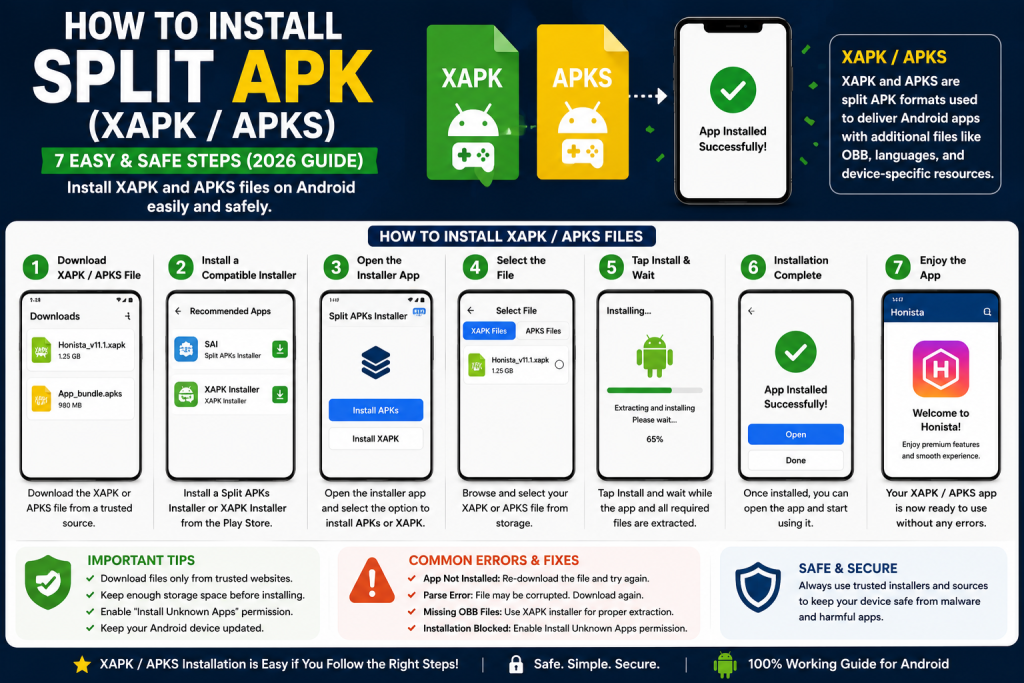
Method 1: Install XAPK Files
The easiest way to install XAPK files is with an XAPK-compatible installer.
Steps
- Download the XAPK file from a trusted source.
- Install an XAPK installer.
- Open the installer app.
- Locate your downloaded XAPK file.
- Tap Install.
- Wait for extraction and installation.
- Open the app.
The installer automatically extracts the APK and OBB files.
Method 2: Install APKS Files
APKS packages require a Split APK installer.
Steps
- Install a Split APK installer app.
- Open the installer.
- Select the APKS file.
- Confirm installation.
- Wait for Android to install all package components.
- Launch the application.
Method 3: Manual Installation (Advanced Users)
Advanced users can manually install Split APKs using Android development tools.
This method generally involves:
- Extracting the package
- Installing multiple APK components together
- Ensuring all required files are included
This approach is recommended only for users familiar with Android app deployment.
Common Installation Errors
App Not Installed
Possible causes:
- Corrupted package
- Missing split files
- Incompatible Android version
- Wrong processor architecture
Solution
Download the correct package again.
Parse Error
This usually indicates:
- Damaged download
- Unsupported Android version
- Incorrect package
Download the latest compatible version.
Missing OBB Files
Large games require OBB files.
Without them, the app may crash or fail to launch.
Use the proper installer so OBB files are placed in the correct location automatically.
Installation Blocked
Enable:
Install Unknown Apps
Then try again.
Best Practices for Safe Installation
Follow these guidelines:
- Download only from trusted websites.
- Avoid modified or cracked applications.
- Keep Android updated.
- Verify app compatibility.
- Scan downloaded files using security software.
- Keep Google Play Protect enabled after installation.
Security should always be your highest priority.
Benefits of Split APKs
Split APK technology offers several advantages:
- Smaller app downloads
- Faster installation
- Better performance
- Lower storage usage
- Optimized device compatibility
- Reduced mobile data consumption
These improvements enhance the Android user experience.
Difference Between APK, XAPK, and APKS
| Format | Contains | Installation |
|---|---|---|
| APK | Single application package | Direct installation |
| XAPK | APK + OBB files | Requires an XAPK installer |
| APKS | Multiple split APK files | Requires a Split APK installer |
Understanding these differences helps you choose the correct installation method. How to Install Split APK (XAPK/APKS).
Frequently Asked Questions
Can I install XAPK files without an installer?
In most cases, no. XAPK packages include additional resources that require extraction before installation.
Is APKS better than APK?
Neither is inherently better. APKS is designed for optimized app delivery and contains multiple APK components tailored to your device.
Are Split APKs safe?
Yes, provided you download them from trusted developers or reputable websites.
Why does Android say “App Not Installed”?
This may happen because of missing split files, incompatible Android versions, insufficient storage, or damaged downloads.
Do I need to root my phone?
No. Split APKs can be installed on most Android devices without root access.
Conclusion
Learning How to Install Split APK (XAPK/APKS) is essential for Android users who download apps outside the Google Play Store. These modern package formats provide better performance, smaller downloads, and improved compatibility, but they require the correct installation method. How to Install Split APK (XAPK/APKS)
Whether you’re installing an XAPK game with additional OBB files or an APKS package created from an Android App Bundle, using the right installer and downloading files from trusted sources will ensure a smooth and secure experience.
By following the steps and best practices outlined in this guide, you can confidently install Split APKs on your Android device while minimizing security risks and installation errors. How to Install Split APK (XAPK/APKS)